Home / Templates / Rideshare Driver Tax & Mileage Tracker
2026 edition · Google Sheets template
Rideshare Driver Tax & Mileage Tracker
Log your miles, fares and expenses in one sheet — an automatic mileage deduction, true net earnings by platform, and a quarterly tax set-aside built for Uber, Lyft and DoorDash drivers.
Rideshare Driver Tax & Mileage Tracker is a $11 one-time .xlsx workbook with 6 tabs. Manual data entry — no platform or odometer sync; you log each trip and payout yourself.
Excel · Google Sheets · LibreOffice · one-time $11
Instant download. If the file is broken, we replace it. A spreadsheet, not tax advice.
The actual file
Browse it before you buy
Every screenshot below is the real Rideshare Driver Tax & Mileage Tracker workbook — real headers, real sample numbers, real formulas. Click a tab.
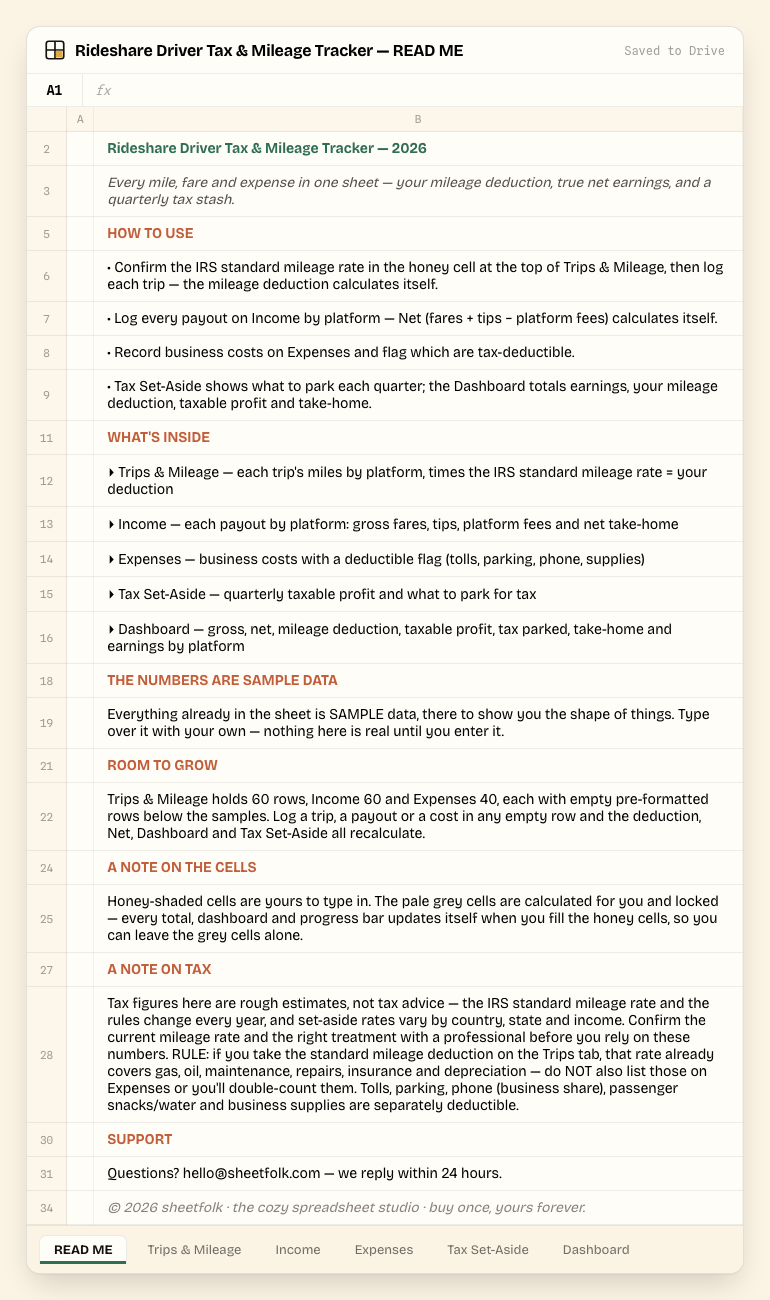
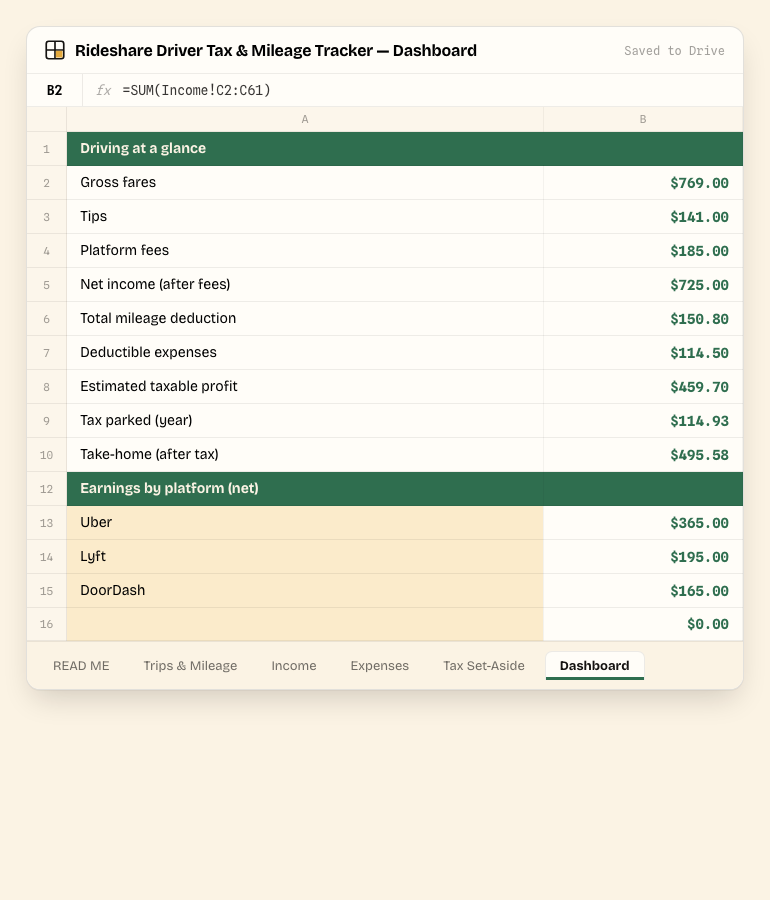
Click a tab — this is the real file, not a mockup. 6 tabs total.
Tab by tab
What's inside
5 tabs shown below, matched to the real column headers in the file.
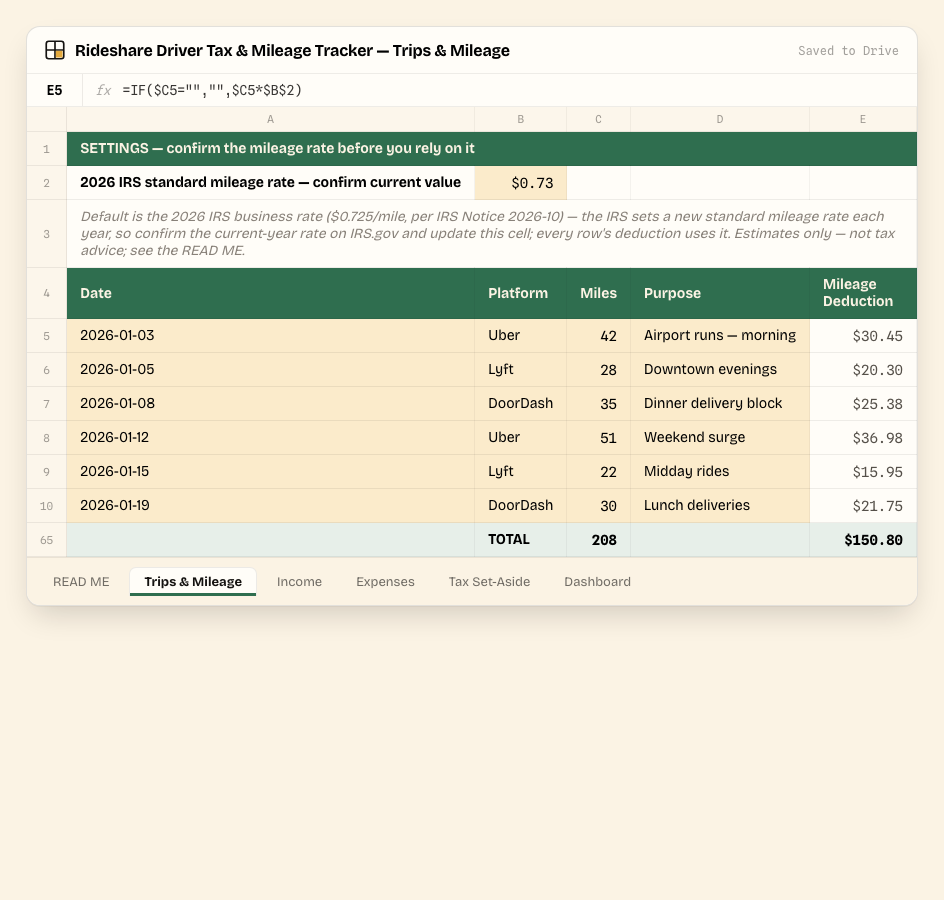
Trips & Mileage
Log each trip's miles by platform; the mileage deduction (miles × the IRS standard mileage rate you confirm in the settings cell) calculates itself.
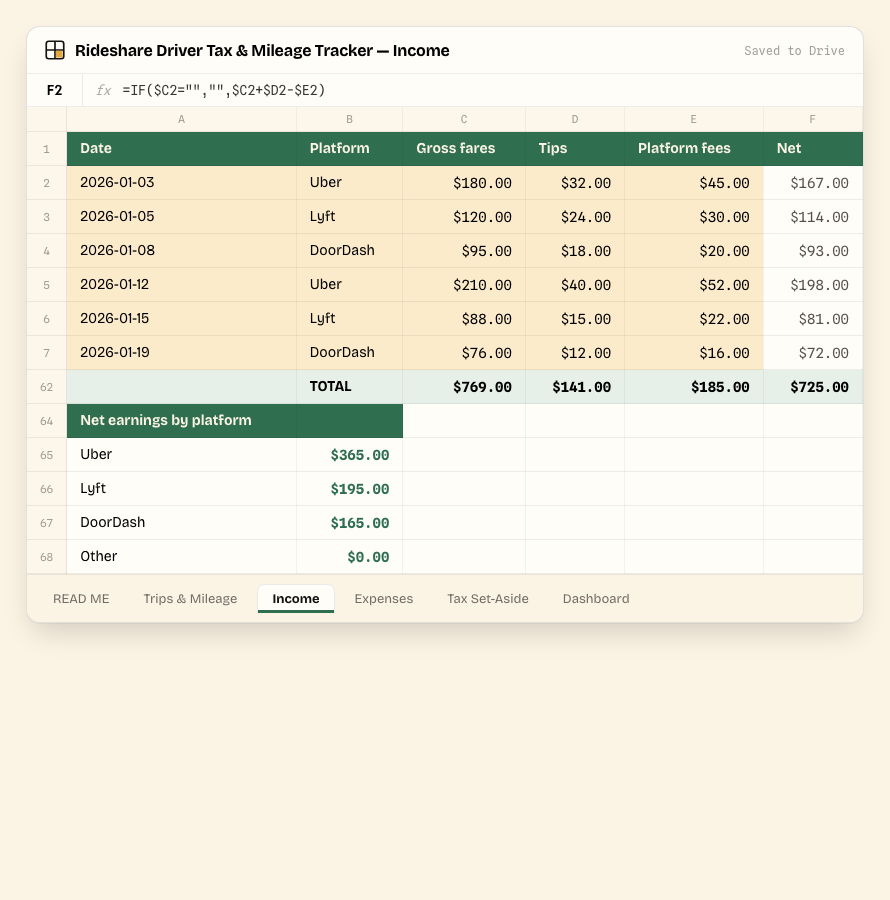
Income
Log each payout by platform with gross fares, tips and platform fees — Net take-home calculates itself, with a net-earnings-by-platform rollup below.
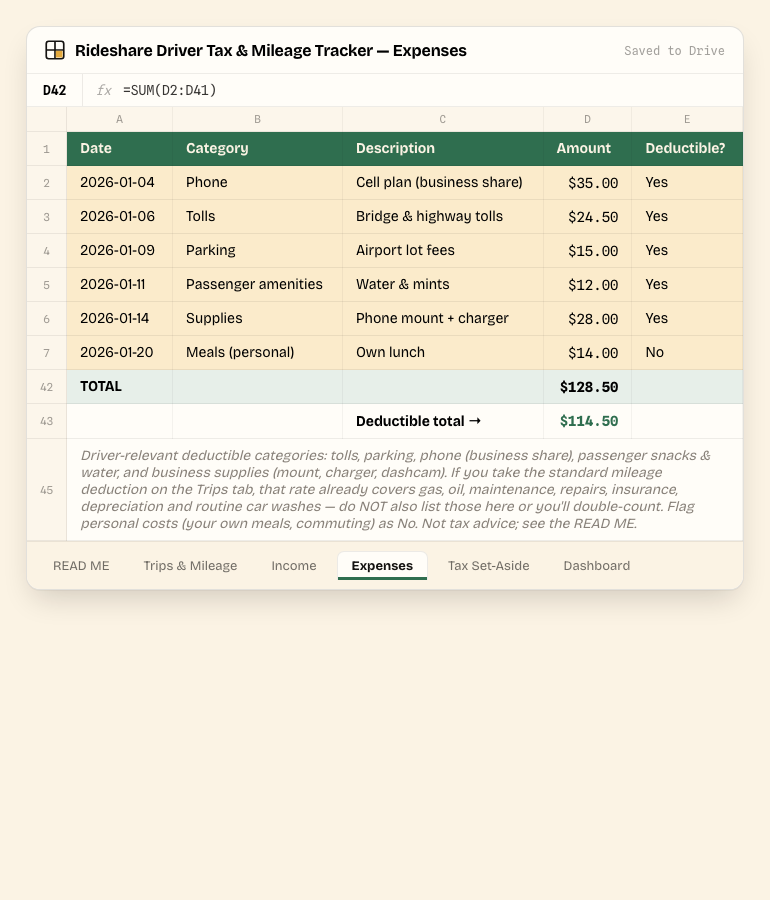
Expenses
Business costs with a Deductible? flag (tolls, parking, phone, passenger snacks, supplies), so your deductible total is always known.
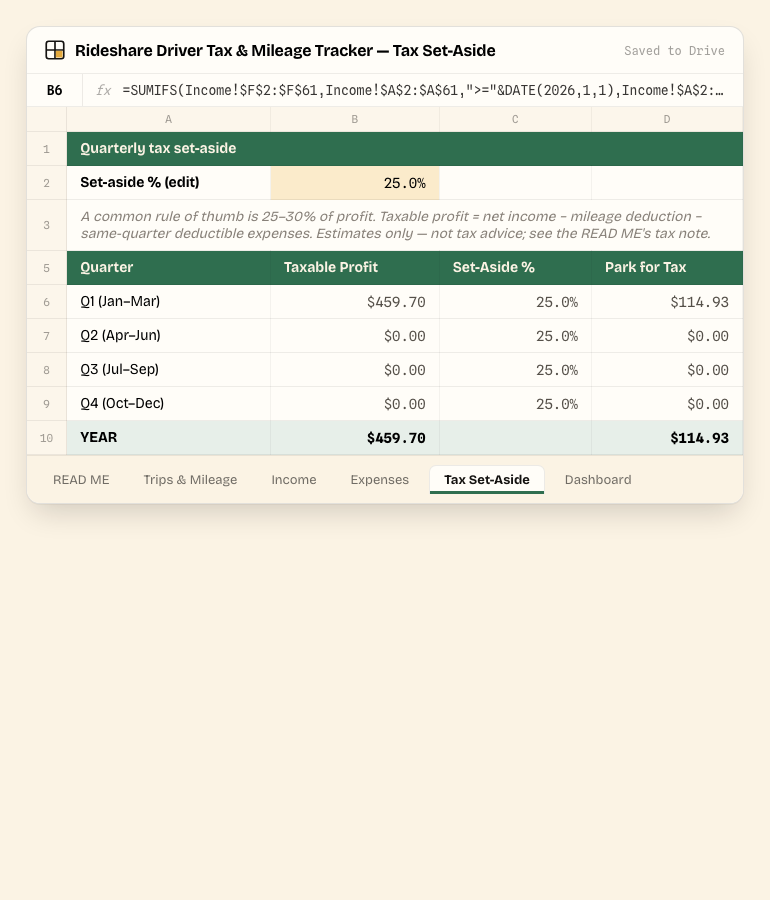
Tax Set-Aside
Pulls taxable profit by quarter (net income − mileage deduction − deductible expenses) straight from the other tabs, and shows what to park at your chosen set-aside rate.
Dashboard
Gross fares, tips, platform fees, net income, total mileage deduction, deductible expenses, estimated taxable profit, tax parked, take-home, and a net-earnings breakdown by platform.
Before you type a thing
It ships filled in — with sample data
Every tab you saw above already has worked example numbers in it, so you can see how Rideshare Driver Tax & Mileage Tracker behaves before you touch it. Study it, then overwrite it — nothing is "real" until you replace the samples with your own numbers.
Honey cells are yours
Any cell shaded honey is an input — type over the sample value with your own. These are unlocked and unprotected.
Grey cells calculate themselves
Pale grey cells hold formulas and are locked. Leave them alone — totals, dashboards and progress bars update automatically as you fill in the honey cells.
Delivery & format
How you get it
Pay with Stripe, land instantly on a download page with your .xlsx workbook — plus an email backup of the same link, in case you lose the tab.
Open it your way: double-click for Excel or LibreOffice, or upload to Google Drive and choose Open with → Google Sheets.
Updates to this 2026 edition are emailed to you free — no repurchase, ever.
Set expectations
What this is not
- Manual data entry — no platform or odometer sync; you log each trip and payout yourself.
- One shared file — sharing and permissions are handled through your own Google Drive, not a built-in login system.
- No native charts — totals and breakdowns show as bold cells and data bars, not chart objects.
- Room for 60 trip rows, 60 income rows and 40 expense rows — generous for most drivers; more than that means extending the SUM ranges yourself, or duplicating the file per quarter.
- Standard mileage method only — it does not compute the actual-expense method; the mileage rate already covers gas, maintenance and depreciation, so don't also deduct those.
- Tax figures are rough estimates, not tax advice — the IRS mileage rate and set-aside rates change; confirm the current rate and your treatment with a professional.
- US-dollar formatting by default — changeable for any currency via Format → Number.
Getting started
Set up in 4 steps
Confirm the IRS standard mileage rate in the honey cell at the top of Trips & Mileage, then log each trip — the mileage deduction calculates itself.
Log every payout on Income by platform — Net (fares + tips − platform fees) calculates itself.
Record business costs on Expenses and flag which are tax-deductible.
Tax Set-Aside shows what to park each quarter; the Dashboard totals earnings, your mileage deduction, taxable profit and take-home.
Good to know
Rideshare Driver Tax & Mileage Tracker FAQ
Published · Updated
What format does it come in?
A single .xlsx workbook. It opens natively in Excel and LibreOffice, and in Google Sheets via "Make a copy".
How do I use it in Google Sheets?
Upload the .xlsx to Google Drive, right-click it, choose Open with → Google Sheets, then File → Make a copy to get your own editable version.
Which mileage rate does it use?
You confirm it. The Trips & Mileage tab has an editable settings cell for the IRS standard mileage rate — it ships with a clearly-labeled placeholder (the 2025 rate) that you replace with the current-year rate, because the IRS sets a new rate each year. Every trip's deduction uses that one cell.
Does it work for Uber, Lyft and DoorDash?
Yes — pick the platform per row from the dropdown (Uber, Lyft, DoorDash or Other). Income and the Dashboard roll up net earnings by platform automatically.
Is the tax set-aside number accurate?
It's a rough estimate — taxable profit by quarter (net income minus your mileage deduction and deductible expenses), times a set-aside rate you choose. Rates vary by country, state and total income, so confirm the right number with a tax professional.
What's your refund policy?
Instant download. If the file is broken, we replace it.
Instant download · No subscription · Free 2026-edition updates